Introduction
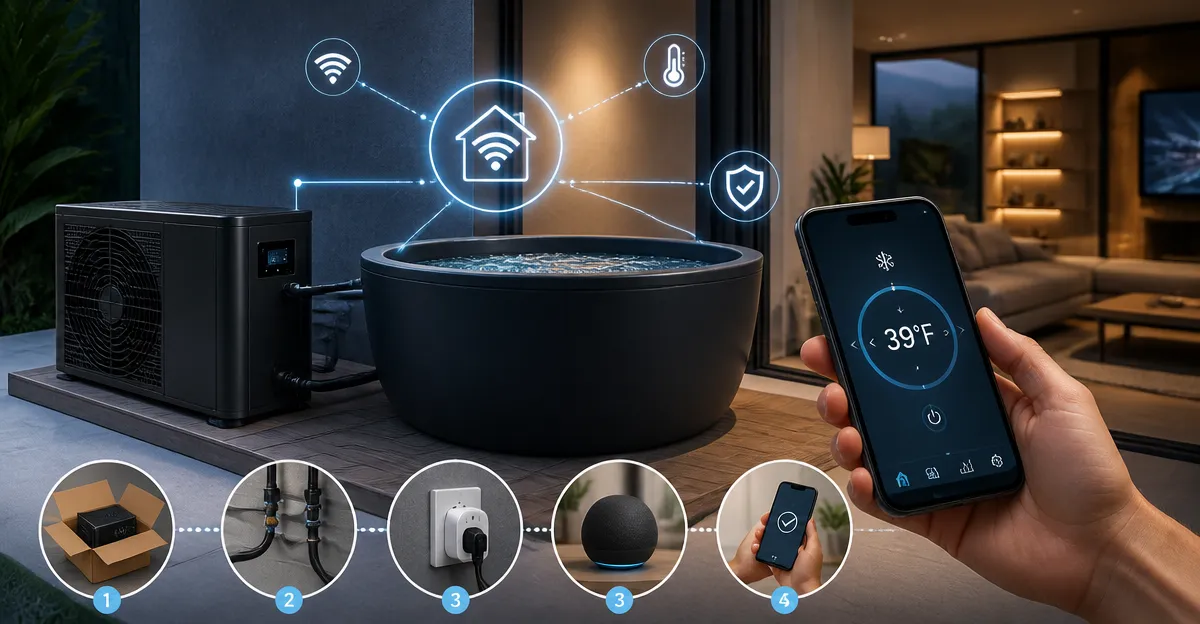
This guide explains how to incorporate a cold plunge chiller into a smart home environment, allowing precise temperature control, automated scheduling, and enhanced safety. Readers will discover the benefits of cold‑water therapy, the technical requirements for integration, and practical methods to achieve reliable operation. The article emphasizes professional installation practices while remaining accessible to an intermediate audience. By the end of the guide, one will be equipped to create a seamless, automated cold plunge system that supports recovery and wellness goals.
What You'll Need
- Cold plunge chiller (choose one from the list below)
- Smart plug or Wi‑Fi outlet compatible with Alexa, Google Home, or HomeKit
- Temperature sensor compatible with your smart hub (e.g., Zigbee or Z‑Wave sensor)
- Water‑proof power strip (optional for multiple devices)
- Submersible pump (included with most chillers)
- Insulated hoses and quick‑connect fittings (included with most chillers)
- Basic plumbing tools: pipe wrench, Teflon tape, and screwdriver
- Safety equipment: non‑slip mat, waterproof thermometer, and surge protector
Step 1: Choose the Appropriate Chiller
Selecting the right chiller is the foundation of a successful smart‑home integration. The AS ColdPlunge Chiller offers a 1/3 HP compressor, LED touchscreen, built‑in pump, and reusable metal filter, priced at $399.00 with a 4.3‑star rating from 168 reviews. It provides consistent cooling down to 42 °F and includes complete accessories for plug‑and‑plunge installation, making it ideal for users who prefer an all‑in‑one solution. For those seeking a slightly lower price point, the FADHOLE Ice Bath Chiller costs $329.99, carries a 4.7‑star rating, and also includes a built‑in pump and reusable metal filter, offering comparable performance with a compact design. If a larger volume is required, the EONIX Ice Bath Chiller provides a 1/2 HP compressor, remote control, and advanced filtration for up to 132 gallons, priced at $369.99 with a perfect 5‑star rating from four reviewers. The AzureaFlow Ice Bath Chiller is a 1/3 HP unit priced at $299.99, rated 4.3 stars, and includes an external filter with PET pleated media for crystal‑clear water. Finally, the budget‑friendly YESBAY Ice Bath Chiller costs $153.98, holds a 5‑star rating, and offers a compact form factor with LED display and remote control. Evaluate the volume of water you intend to chill, the space available, and your budget before making a final decision.
Step 2: Prepare the Electrical Infrastructure
Smart home integration begins with reliable power delivery, therefore a dedicated circuit or a high‑amperage smart plug is recommended. Choose a Wi‑Fi smart plug that supports scheduling and energy monitoring, such as a TP‑Link Kasa or an Amazon Smart Plug, and ensure it can handle the chiller's maximum draw (typically 120 V, 10‑15 A). Connect the smart plug to a grounded outlet and place a waterproof surge protector nearby to protect against voltage spikes. After plugging in the chiller, verify that the smart plug reports power usage within the expected range; this data will be useful for future automation rules that prevent overload. Finally, add the smart plug to your preferred voice assistant platform, naming it something descriptive like “Cold Plunge Chiller”.
Step 3: Install the Chiller and Connect Plumbing
Begin by positioning the chiller on a stable, level surface near the tub, allowing at least six inches of clearance for airflow and maintenance access. Attach the insulated hoses to the 1/2" inlet and outlet ports, using the supplied quick‑connect fittings and Teflon tape to ensure a leak‑free seal. If the tub lacks dedicated ports, employ the included submersible pump to circulate water; the pump should be placed in the deepest part of the tub to maintain even flow. Secure the hoses with zip ties or hose clamps, and test the system by briefly turning on the chiller to confirm water movement and temperature drop. For larger installations, consider adding a check valve to prevent backflow, which can protect the pump and extend its lifespan.
Step 4: Integrate Temperature Sensing and Automation
Accurate temperature feedback is essential for precise control, therefore install a waterproof temperature sensor near the water inlet where mixing is most representative. Choose a Zigbee or Z‑Wave sensor compatible with your hub, and place it in a protective sleeve to avoid direct contact with moving water. Pair the sensor with your hub, then create an automation that reads the sensor value and adjusts the smart plug accordingly. For example, set a rule: if temperature rises above 45 °F, turn the chiller on; if it falls below 40 °F, turn the chiller off. This logic prevents unnecessary runtime, reduces energy consumption, and maintains the desired therapeutic range. Additionally, configure a daily schedule that powers the chiller on two hours before the typical plunge time, ensuring the water reaches target temperature without manual intervention.
Step 5: Configure Remote Control and Voice Commands
Most chillers include a digital control panel; however, remote operation via smartphone or voice assistant provides greater convenience. The EONIX Ice Bath Chiller includes an LED touch screen and a dedicated remote control, allowing users to adjust temperature without leaving the tub. Pair the remote with your smart hub if it supports infrared or Bluetooth bridging, or simply use the hub's app to send on/off commands to the smart plug. Create voice shortcuts such as “Alexa, start cold plunge” that trigger the smart plug and optionally announce the current water temperature using the sensor data. Test each command to confirm reliable response, and adjust the phrasing if necessary to avoid ambiguity.
Tips & Pro Tips
- Place the chiller in a well‑ventilated area; inadequate airflow can increase noise and reduce cooling efficiency.
- Run the chiller on a timer during off‑peak electricity hours to lower utility costs, especially for high‑capacity models like the EONIX.
- Rinse the metal filter weekly and the PET pleated filter monthly to prevent debris buildup that can impair water flow.
- Use a non‑slip mat around the tub to reduce the risk of falls, particularly when entering a cold environment after a workout.
- Consider adding a water‑level sensor that alerts you when the tub is low, preventing the pump from running dry.
Troubleshooting
- Chiller does not turn on: Verify that the smart plug is receiving power and that the chiller’s power switch is engaged. Check the circuit breaker for a tripped overload.
- Water temperature is higher than set point: Ensure the temperature sensor is correctly positioned and not exposed to direct sunlight or warm air currents.
- Excessive noise: Confirm that the chiller has at least 12 inches of clearance on all sides and that the inlet/outlet hoses are not kinked, which can cause the compressor to work harder.
- Filter clogging: Increase the frequency of filter rinses if you notice a drop in water flow; consider adding a secondary pre‑filter to capture larger particles.
Conclusion
Integrating a cold plunge chiller into a smart home combines the therapeutic benefits of cold‑water immersion with modern convenience and safety. By selecting the appropriate chiller, establishing a reliable power and plumbing setup, and leveraging temperature sensors and smart plugs, one can achieve automated, remote‑controlled operation that fits seamlessly into daily routines. The tips and troubleshooting advice provided ensure long‑term reliability and optimal performance. Embrace this technology to enhance recovery, improve sleep, and enjoy a personalized wellness experience at home.
Products Mentioned in This Guide
Frequently Asked Questions
Can I control a cold plunge chiller with Alexa or Google Home?
Yes, connect the chiller to a compatible smart plug or Wi‑Fi outlet, then link it to your Alexa or Google Home app for voice and app control.
What type of temperature sensor works best for a smart cold plunge system?
A Zigbee or Z‑Wave waterproof temperature sensor that integrates with your smart hub provides accurate, real‑time readings.
Do I need a waterproof power strip for multiple devices?
A waterproof power strip is optional but useful if you plan to power the chiller, pump, and sensors from a single outlet safely.
How can I automate the cold plunge schedule?
Use your smart hub’s routine or automation feature to turn the chiller on/off at set times or based on temperature thresholds.
What safety measures should I install with a smart cold plunge?
Install a non‑slip mat, a waterproof thermometer, and consider a leak‑detect sensor to shut off power if water reaches electrical components.